The conversation most contractors eventually have.
You did what you always do. The client wanted to add a bump-out off the back of the kitchen. You typed up what it would involve — extra framing, a little more electrical, some adjustments on the finish side — and put a number on it: about $3,000. You sent it over in an email.
A few hours later, the reply:
"Sounds good"
You moved forward. Two months later, when you sent the final invoice, the conversation still happened.
"I don't remember agreeing to that." or the classic "I thought that was included." or worst of all "I'm not paying $3,000 for something I didn't know was going to be $3,000."
Most every contractor has had this conversation. Maybe it ended in you eating the cost. Maybe it ended in a 40-minute phone call where you pulled up the old email thread and read it back, line by line. Maybe it ended with the client paying but leaving a 2-star Google review.
What almost never happens: the client looks at the old email, agrees they approved it, and writes the check. And here's what's worth sitting with for a second — it isn't because you failed to document. You didn't verbally agree to it in the driveway and hope for the best. You wrote it up. You sent it. They replied. There's a paper trail. It still got disputed. So the question isn't should I be documenting change orders. You already are. The question is why documenting them doesn't prevent disputes.
The three reasons change order disputes happen anyway
Over the years, I’ve hired contractors for my own projects more times than I can count — from building custom homes to landscape renovations. And almost every single time, something needed to change after the initial proposal was signed. What's the one thing I noticed? None of them had a solid process for handling project scope changes.
Here are the three patterns I saw repeatedly:
1. The approval was casual, not structured
"Sounds good, let's do it" — that’s the approval most change orders actually get. Not a signed line item. Not an initialed acknowledgment. Just a quick email reply typed from a phone, squeezed between a work meeting and school pickup.
From the client’s side, if you asked them later, they’d honestly admit they didn’t really read it. They saw the subject line, skimmed the first few lines, spotted the price, thought “yeah, that sounds about right,” and hit reply. They were trusting you to handle it — the same way they trust the lumberyard to deliver the right studs. The problem is: “I trust you to handle it” and “I approve this specific scope, for this specific price, with this specific schedule impact” are not the same thing. But in an email thread, they look identical. Three words. A timestamp. No real acknowledgment of anything in particular.
Later, when the invoice lands and the client pushes back, their memory isn’t wrong — they truly didn’t read the details closely. They just agreed to the vibe of it. A casual approval doesn’t hold up the way a structured one does, because there’s nothing in the record that proves they saw the specifics and agreed to them. Only that they said yes to something.
This is the failure mode contractors think about the least, because it doesn’t feel like a gap. You followed up. They responded. What else were you supposed to do? Turns out… quite a bit. And that’s the rest of this post.
2. The document is ambiguous
Here’s a real example from a contractor I know: His client wanted to add “a couple of recessed lights” in a bathroom that already had rough-in for one. The contractor emailed:
“Additional electrical for the bathroom — $1,200. Let me know and I’ll get it going.”
The client replied:
“Go ahead.”
The contractor pulled a new circuit (because the original couldn’t handle the load), installed six lights (since “a couple” in conversation had clearly meant six), and added the line items to the next bill.
When payment time came, the client disputed the $950 second-circuit charge. Not because they forgot the email — they still had it on their phone. They disputed it because they never approved an additional light circuit. The contractor had buried the $950 circuit cost inside the $1,200 total along with the fixtures.
This is the trap that catches contractors who think they’re already documenting everything. The document exists — it’s just an email. But it’s not detailed enough to prevent the argument. “Additional work,” “scope add,” “misc. materials,” or “additional electrical — $1,200” aren’t real change orders. They’re placeholder text with a dollar figure next to them.
A change order that actually prevents disputes has to clearly answer every question that can come up later: What exactly is being added? Which materials are included (and which aren’t)? How many days does it push the schedule? And what happens to the payment schedule? If any of those get left to the verbal side of the relationship, that’s exactly where the dispute will show up.
3. The document is disconnected from the money
You know that awkward conversation that happens on pretty much every job with change orders? You’re out on site, things are moving along, and you need to bring up the $3,000 bump-out the client approved back in week two. It was signed off, but nobody ever pinned down when or how it would get paid. There’s no milestone tied to it — it’s just floating out there.
So you say something like, “Hey, with that bump-out we did, the total’s up about three grand. Want me to roll it into the next draw, or handle it separately?”
The client gives a vague “Yeah, sure” or “We’ll figure it out later.” You don’t want to push and kill the good vibe, so you let it go and keep working.
That same dance repeats with every change order on every job. Each one creates a little opening — for the client to say “let’s settle it at the end,” for the price to turn into a negotiation, or for the easy relationship you’ve built to start feeling transactional. Suddenly you’re no longer just the guy doing the work. You’re the guy asking for money.
This happens because the change order lives in one document and the payment schedule lives in another. They never really merge. Every extra bit of work becomes its own separate billing headache you have to chase down. Meanwhile, the client is still looking at the original schedule as “the job.” When the supplemental invoice shows up — or when you have to bring it up on site — it feels like an after-the-fact charge.
The document itself isn’t the real problem. The process is. Nothing ever tied the change order directly to the money the client was actually tracking.
What a change order process has to do instead
If those three pit falls stay implicit, vague, and disconnected from the actual money, then no fancy new template is going to fix it. A prettier Word document won’t solve the problem.
The real fix has to be operational. A solid change order process needs to do three things well:
First, it has to stay visible. The change order should live in the exact same place the client already checks for project updates — not buried in an email thread. If they have to go hunting for it, they won’t. And that dispute conversation is already coming.
Second, it has to be structured. No vague free-text notes. A good change order forces you to clearly answer: What exactly is being added? How much does it cost? What materials are included? How does it affect the schedule? And — most importantly — does the client explicitly agree to all of it? If any of those pieces can be skipped, they eventually will be… usually on the exact change orders that blow up later.
Third, and this is the big one: it has to update the costs the client actually sees. The moment a change order is approved, their running total and payment schedule should update right then and there. Not in some separate document. Not on a supplemental invoice two weeks later.
That’s the process. You can certainly try to handle all this on paper if you’re highly disciplined. But in reality, most contractors are just too busy to stay perfectly consistent with every step — especially that third one, which is genuinely tough without a good system.
Or you can use a tool that builds in the structured form, shared visibility, and automatic payment update by default.
What that looks like in practice
That’s exactly why we built the scope change workflow into TruFeld.
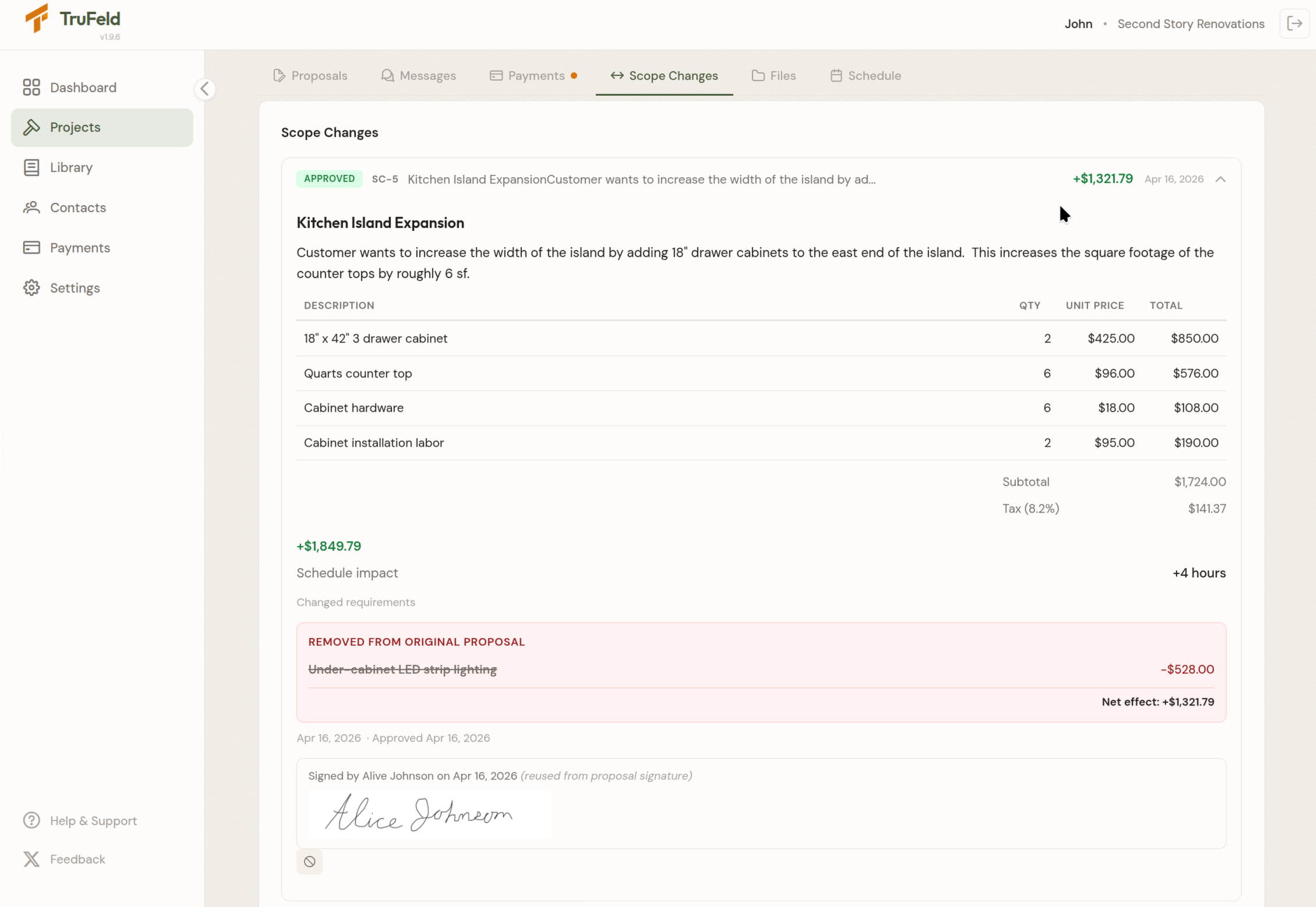
Every project lives in one clean portal — the same place the client uses to view and sign the proposal, make payments, review the schedule, view and upload files, and send messages, is also where they'll review and approve scope changes.
When the scope needs to change, the contractor simply sends a formal change order from inside that same portal. It includes structured fields for the new scope, pricing, schedule impact, and clear acknowledgment from the client.
Video 1. Sending a scope change in TruFeld
Every change order carries the detail that prevents ambiguity — scope, pricing, materials, schedule impact, an separate initials for acknowledgment.
The client receives an email telling them a scope change awaits their review, they open the portal, the pending change order is waiting. They read it sign and approve or decline with a reason. Nothing to download. Nothing to print.
Video 2. Client approving a scope change in TruFeld
The client's approval is timestamped and stored next to the original proposal — not in an email thread. And the moment they approve, the payment schedule updates automatically. The client sees the new project total. The payment milestone(s) targeted in the scope change include the adjustment. There's no "supplemental invoice" later — the number they were tracking is already the right number.
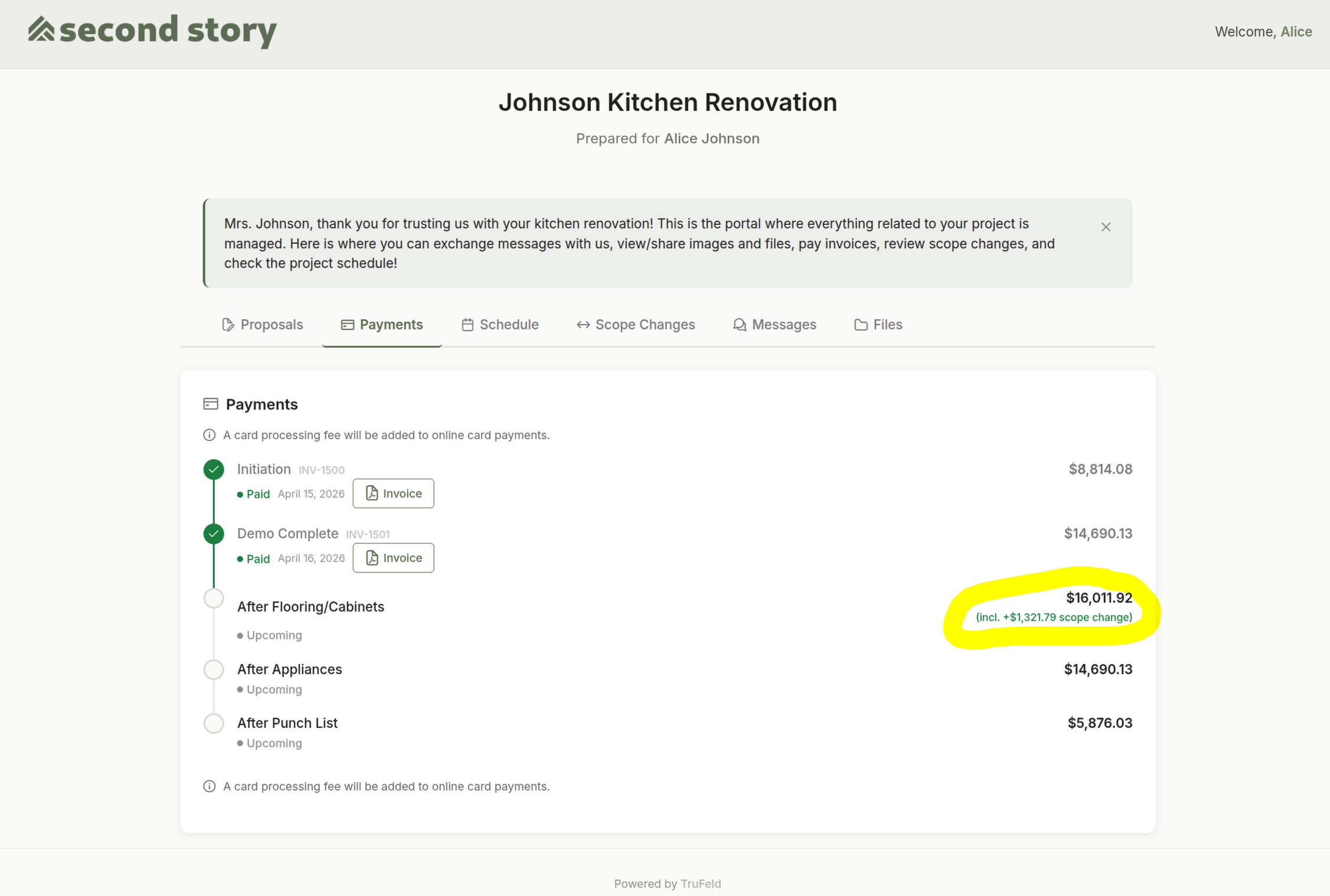
Fig 1. Client's portal reflecting the scope change in the payment schedule
The approved change order flows straight into the payment schedule. The client never sees a bill they didn't expect.
See the formal change orders feature →
The takeaway
If you've been documenting change orders and still having the dispute conversation, the answer isn't to document harder. It's to run the change order process somewhere your client can see it, in a form that can't be ambiguous, connected to the money they're already tracking.
Because a change order that lives in an email, says "additional work," and doesn't move the payment schedule isn't really a change order. It's a placeholder — and placeholders are what the awkward conversation is about.
Try the change order workflow on your next project. Free to start. No monthly fee, ever. Start free →
Steven Hines is the founder of TruFeld. Before TruFeld, he hired contractors for his own projects more times than he can count — and watched the same problems play out every time. TruFeld is the project portal he wishes those contractors had used.